


PI Server 2018がリリースされ、新しい機能が多いですが、すぐに利用してみた機能は下記に公開しました。
体重の予測モデル
今回は一つのAF SDKの関数を紹介したいと思っています。
イベントフレームの機能は非常に便利だと思いますが、一つのAFサーバーで保存できるイベントフレームの数は限れています。
そのために、必要のないイベントフレームを周期で削除することが必要になるケースがあります。
イベントフレームを削除のために、PI System Explorer、AFDiagやAF SDKなどいろいろな方法があります。
AF 2018のバージョンからAF SDKからよりいい方法が提供されました。
2018のバージョンからAFEventFrame.DeleteEventFramesの関数があり、イベントフレームのIDのリストを取得すると一括で膨大のイベントフレームの削除は可能です。
IDを取得するために、下記のサンプルコードはAFEventFrameSearchのオブジェクトを利用します。
using System;
using System.Linq;
using System.Collections.Generic;
using OSIsoft.AF;
using OSIsoft.AF.EventFrame;
using OSIsoft.AF.Search;


namespace MassEFDelete
{
 class Program
 {
 static void Main(string[] args)
 {
 PISystem af = new PISystems().DefaultPISystem;
 AFDatabase db = af.Databases["Demo_Maximo_Integration"];


 // Retrieve all event frames that match the query, then access their GUID to delete them
 string query = @"Template:'Daily Event Frame' End:<'*-1d'";
 AFEventFrameSearch search = new AFEventFrameSearch(db, "Daily Event Frames", query);
 List<Guid> ids = search.FindObjectIds().ToList();

 AFEventFrame.DeleteEventFrames(af, ids);
 }
 }
}
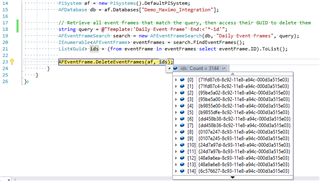
このサンプルコードの実行結果です。
イベントフレームを検索するためにパフォーマンスのコツを下記の記事にいろいろあります。