


We at OSIsoft are always trying to help you, our customers, get as much value from the PI System as possible and with that, make your day-to-day life easier too.
Working with new and existing customers, one common question is “where do I start with AF?”. It is often followed by the common misconception that it will either take too long or it will be too hard to model anything in AF. The best answer is to pick an initiative, something that would make your life easier, and focus on it. Start by mapping the data you will need in the project and then move to enhancing the data with calculations, aggregations, etc. This will allow you to take advantage of other functionalities such as Event Frames and Notifications.
If you are not feeling creative and need something to help you kick start your AF database, this is a good example for a (substation) transformer. Although this element template has less than 50
attributes, it may contain some measurements not currently available through your existing telemetry. Not to worry, isn’t it is easier to delete than create new ones? Off we go…
Here is a list of all the attributes it comes with:
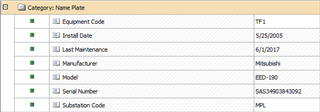
In this example, the name plate information comes from an external relational database table and “table lookup” references are used to bring them into AF.

Here you see the power related data such as loads, voltage and amperages.

Next, the list of gases and their concentration as part of a dissolved gas analysis.

Some key information about a transformer is its temperatures:

And finally, winding voltages, amperages and temperatures:

PS1: One thing to keep in mind is that It uses substitution parameters so AF can resolve tag names automatically. This helps deploy elements in bulk and it does the tag-to-attribute mapping for you, so you don’t do it manually, one-by-one.
PS2: No analysis were added to this template. There will be a follow up post with use cases just for that.
